
Three platform updates that expand safety control, global reach, and field team efficiency — available now.
Platform updates don’t always arrive with fanfare. But the three features XQ360 released in June 2026 address problems that fleet managers, safety teams, and field technicians encounter daily — and have been working around for years.
This post covers what each update does, why it was built, and how it fits into the broader picture of running a compliant, efficient forklift fleet. If you manage vehicles across multiple sites, languages, or service teams, at least one of these changes directly affects your operation.
UPDATE 01 Danger Tag — Safety & Risk Management
Danger Tag: supervisor control from the moment a fault is detected
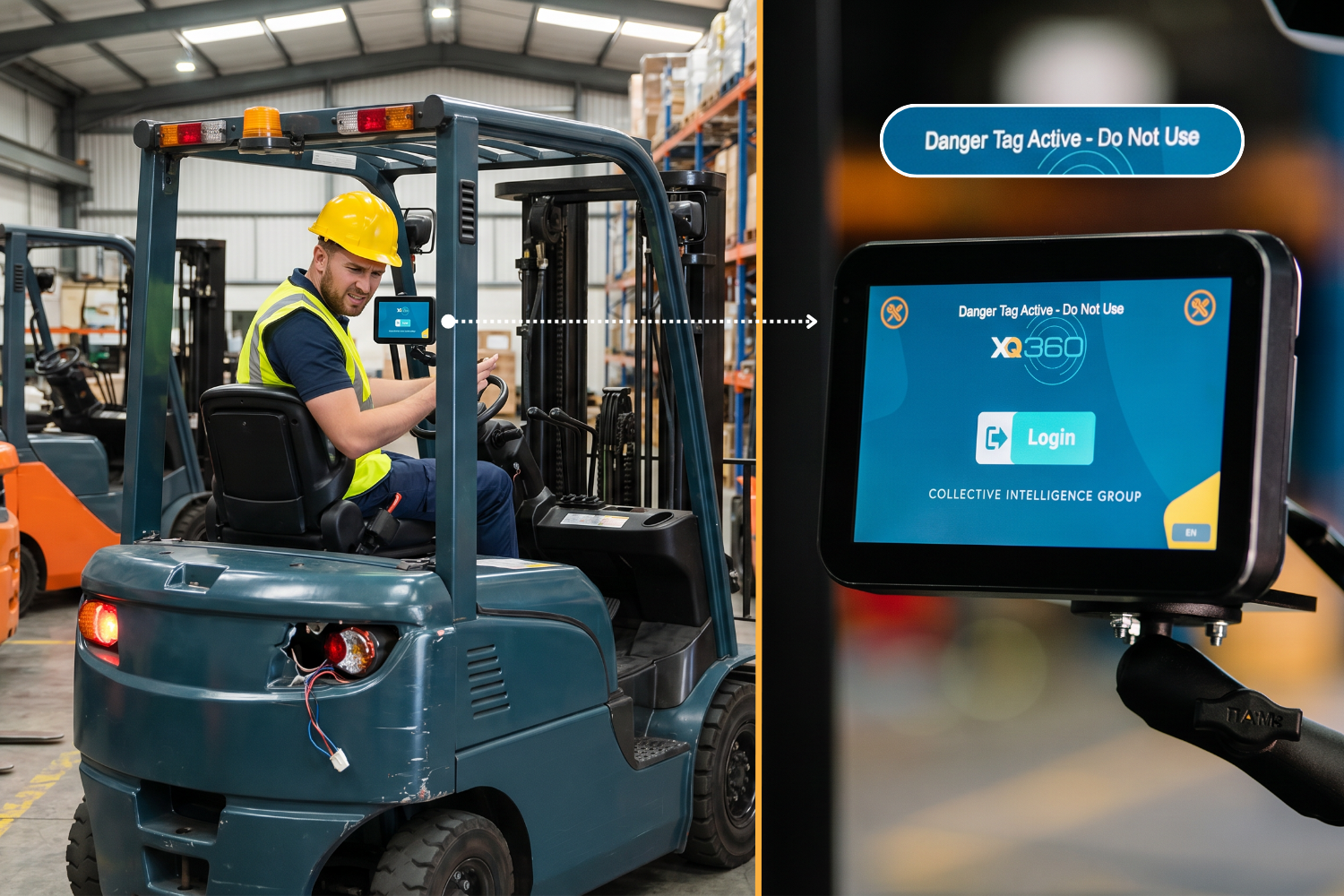
There is a gap that most incident post-mortems eventually identify: the window between when a fault is detected and when the vehicle stops moving. Checklists catch problems. Supervisors respond. But in the time it takes for a supervisor to reach the vehicle, an operator has already made a decision — often the wrong one.
Danger Tag was built to close that window.
What it does
When a critical fault is detected on any XQ360-connected vehicle, a supervisor can immediately disable the vehicle remotely — from the platform dashboard or directly on-site. The moment the Danger Tag is activated:
- Standard operators cannot start or access the vehicle. No workarounds exist — the tag is enforced at the hardware level.
- A timestamped record is created: who activated the tag, when, and for how long.
- The vehicle remains locked until a supervisor with the appropriate access level releases the tag and confirms the issue has been resolved.
Why it matters operationally
For Safety Managers, Danger Tag addresses a documentation gap that often only becomes visible after an incident: the period between a fault being flagged and equipment being officially removed from service. Without a mechanism to enforce that gap, operators rely on judgment calls they shouldn’t have to make — and supervisors are left trying to reconstruct a timeline from incomplete records.
With Danger Tag active, every fault response is documented automatically. The audit trail shows not just that a defect was found, but that the equipment was controlled from the moment it was flagged.
The compliance angle: OSHA, PUWER, Safe Work Australia, and LATAM
The requirement to remove unsafe equipment from service — and document it — appears across every major regulatory framework applicable to forklift operations:
- OSHA (US):
Under 29 CFR 1910.178(q)(2), powered industrial trucks found to be in need of repair must be removed from service immediately and not returned until safely repaired.
- PUWER (UK):
The Provision and Use of Work Equipment Regulations 1998 require that unsafe equipment be withdrawn from use until properly examined and, where necessary, repaired.
- Safe Work Australia / WHS Act (AUS):
Under the Model Work Health and Safety Act and corresponding state-level WHS regulations (WorkSafe VIC, SafeWork NSW, and others), PCBUs have a duty to ensure plant is without risks — which includes removing defective equipment from service until inspected and repaired.
- LATAM — NOM-006 (MX) and equivalent frameworks:
In Mexico, NOM-006-STPS-2023 establishes safety conditions for the operation of industrial forklifts. Equivalent obligations exist under Colombia’s Resolución 0312 de 2019 and Brazil’s NR-11 and NR-12.
Danger Tag makes the required response automatic, verifiable, and exportable — regardless of which regulatory framework applies to your operation.
UPDATE 02 Multilanguage Support — Global Adoption & Workforce Safety
Multilanguage support: when safety instructions need to be understood, not just displayed
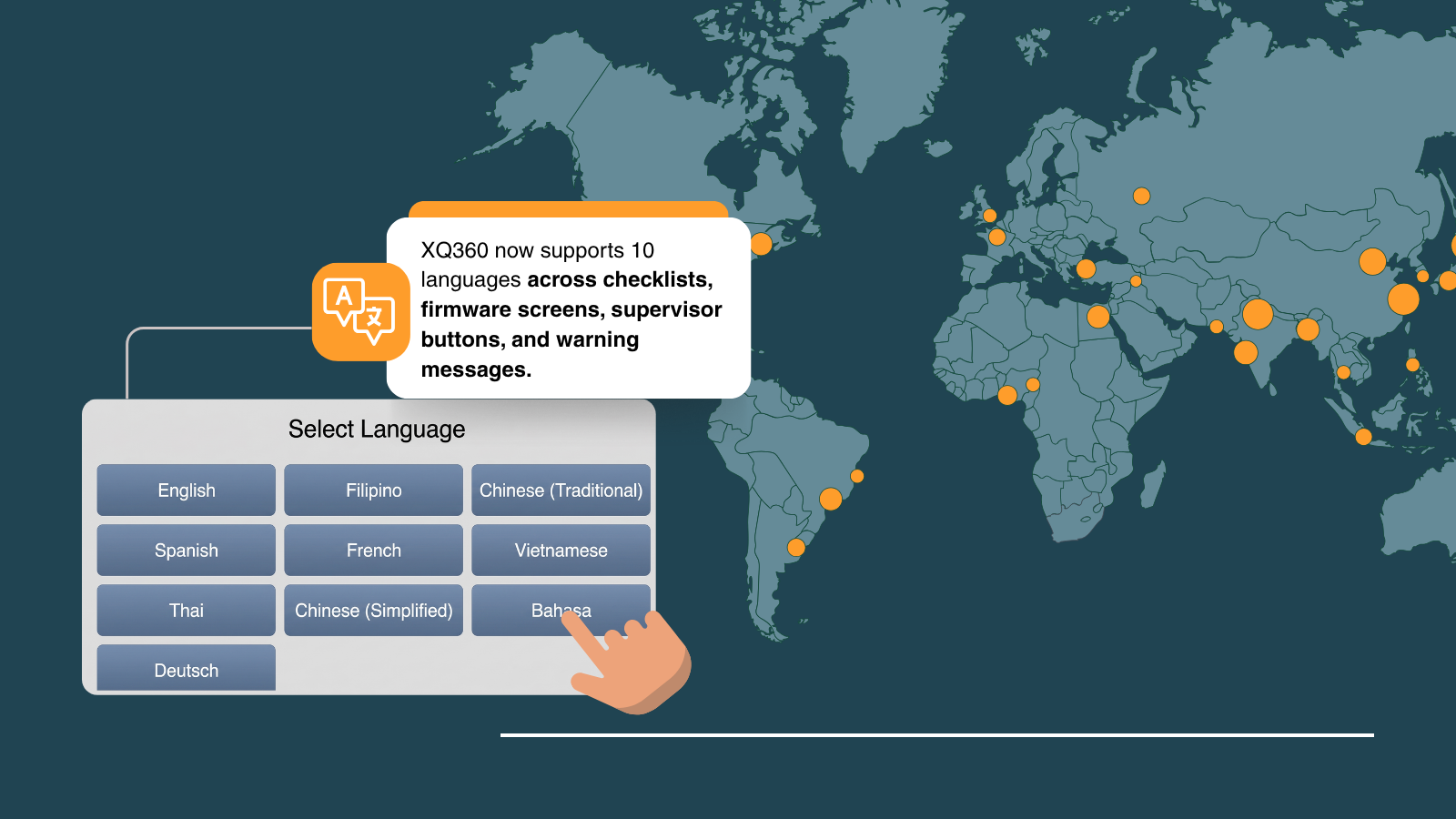
Language has always been treated as a UX consideration in fleet software. XQ360‘s approach treats it as a safety requirement.
In June, XQ360 expanded its language support to include German, Simplified Chinese, Indonesian, and additional languages — applied across every operator-facing element of the platform.
What changed
The new language configuration applies platform-wide, not just to selected screens:
- Pre-shift checklist reports and questions
- Firmware screens on the vehicle unit itself
- Supervisor buttons and access control labels
- Warning messages and fault alerts
Language configuration is set at the site level by Collective Intelligence Group. An operation running facilities in Germany, Indonesia, and the UK can assign the correct language to each location without changing the platform structure or reporting hierarchy.
For a full overview of how language standardization fits into global workforce safety strategy, the ISO 45001:2018 standard on occupational health and safety management systems provides the framework most multinational operations reference when formalizing these requirements.
Why this is a safety outcome, not just a UX improvement
A warning message only works if the person reading it understands it. In multinational distribution centers and warehouses, operators working in a language they don’t fully command respond more slowly to alerts, misread fault descriptions, or skip steps they can’t parse quickly — not from negligence, but because the system wasn’t built for them.
For operations under ISO 45001 or with ESG reporting obligations, language-native safety communication is increasingly part of what ‘workforce safety standardization’ means in practice.
UPDATE 03 Transport Driver & Technician PIN — Field Team Efficiency
Transport Driver PIN and Technician PIN: built for teams that move between vehicles
Operator PIN authentication in XQ360 has always been designed around a one-to-one relationship: one operator, one credential, one vehicle at a time. That model works well for facility-based fleets. It creates friction for the teams that move between them.
June’s update introduces two new access modes designed specifically for field technicians, dealer support teams, and service operations:
Transport Driver PIN
A single master PIN that works across multiple vehicles and multiple client accounts, with a built-in 5-minute session limit. Every session is logged with the same traceability as a standard operator login — the difference is that the credential is designed for temporary, high-mobility access rather than a fixed assignment.
This mode is particularly suited to:
- Service technicians managing vehicles across client sites in a single day
- Rental operations where vehicles rotate between clients frequently
- Dealer support workflows where a technician needs quick access to diagnose or configure a unit
Technician PIN
Full supervisor-level permissions for technicians who require cross-account access. Where a facility manager’s permissions are scoped to their site, a Technician PIN grants access across accounts — without requiring workarounds like shared supervisor credentials or manual permission overrides.
The practical impact: faster service cycles, higher technician productivity, and a clear access hierarchy that doesn’t create exceptions that are difficult to audit later.
Accountability is preserved throughout
Both access modes maintain the full traceability that XQ360‘s compliance architecture depends on. Every session — regardless of which PIN type was used — is logged with the credential, the vehicle, the timestamp, and the duration. The audit trail is not simplified for convenience; the access is.
For operations that require individual operator accountability, the OSHA Powered Industrial Truck eTool outlines what documented operator accountability looks like in practice — the same standard XQ360’s PIN architecture is built to meet.
XQ360 by Collective Intelligence Group: the platform behind each update
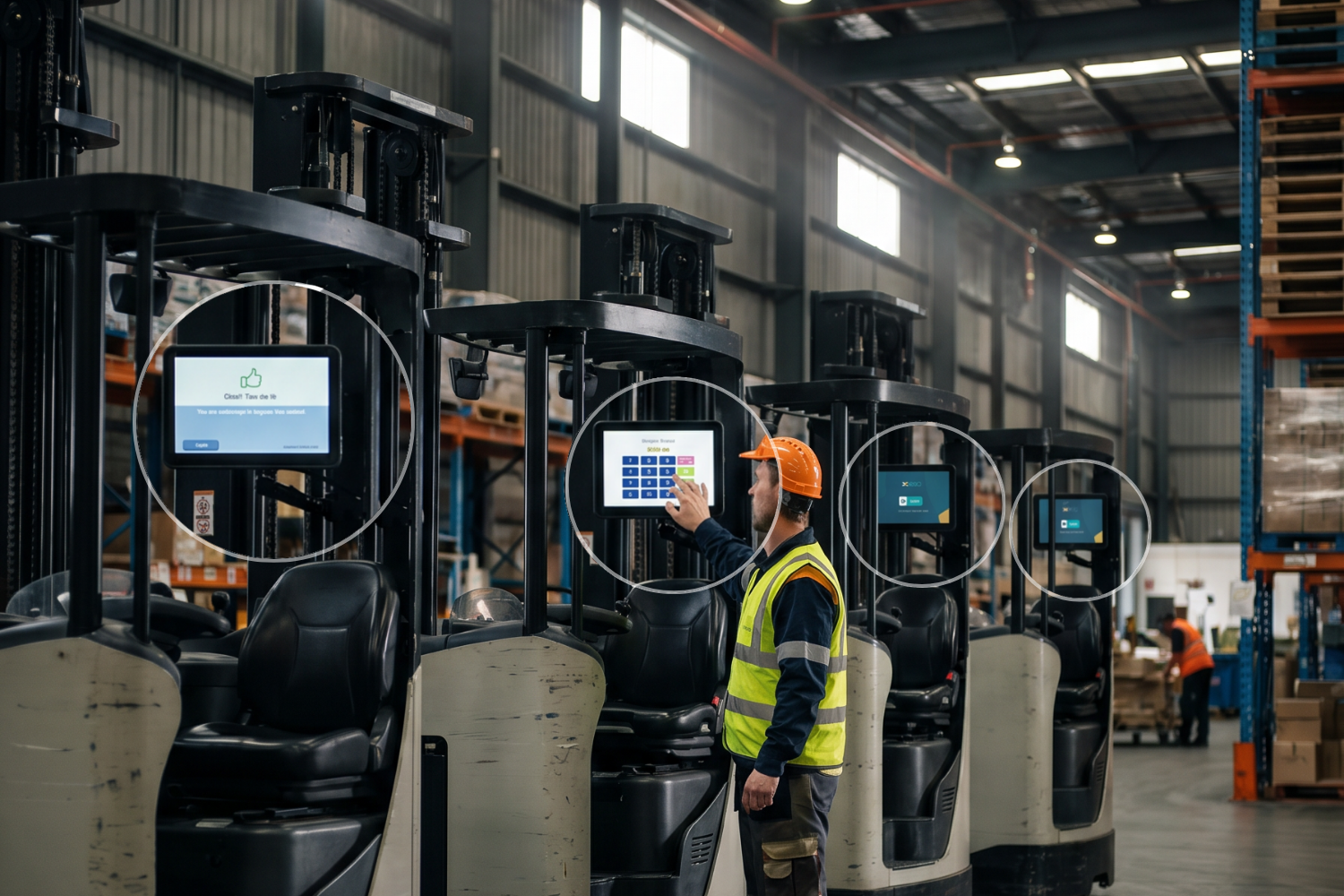
Each of these updates was built as part of XQ360‘s broader platform — a forklift fleet management and compliance system developed by Collective Intelligence Group (CIG). XQ360 connects individual operator accountability, real-time safety control, and multi-site reporting into a single platform that safety managers, operations directors, and field teams can actually use.
The June updates reflect the three directions the platform continues to develop:
- Safety control that doesn’t depend on supervisor proximity — Danger Tag
- Global reach without compromising protocol consistency — Multilanguage Support
- Access architecture that matches how field teams actually work — Transport Driver and Technician PINs
All three are live. All three are configurable for your operation’s specific structure, access hierarchy, and compliance requirements.
Frequently asked questions
What is Danger Tag in XQ360?
Danger Tag is a real-time vehicle lockout feature that allows supervisors to immediately disable any XQ360-connected vehicle with a critical fault — from the platform or on-site. Once active, standard operators cannot start or access the vehicle until a supervisor with the appropriate permissions releases the tag. Every Danger Tag session is fully logged for compliance and audit purposes.
Does XQ360 support multilingual warehouse operations?
Yes. XQ360 now supports German, Simplified Chinese, Indonesian, and additional languages, applied across pre-shift checklists, firmware screens, supervisor controls, and fault alerts. Language is configured at the site level by CIG, allowing multinational operations to standardize safety communication in each operator’s primary language without changing the platform’s reporting structure.
What is the Transport Driver PIN and how does it differ from a standard operator PIN?
A standard operator PIN in XQ360 assigns one credential to one operator with a fixed vehicle or site assignment. The Transport Driver PIN is a master credential that works across multiple vehicles and client accounts, with a built-in 5-minute session limit for controlled, traceable temporary access. It is designed for field technicians, dealer support teams, and rental operations where credentials need to follow the technician, not the asset.
Is the audit trail affected when using Transport Driver or Technician PINs?
No. Both access modes maintain the same session logging as standard operator credentials. Every session is recorded with the credential used, the vehicle accessed, the start time, and the duration. The audit trail is complete and exportable in the same format as all other XQ360 records.
How does XQ360 help operations meet OSHA, PUWER, Safe Work Australia, and LATAM compliance requirements with these June updates?
Danger Tag supports the obligation to remove unsafe equipment from service and document it in real time. Under OSHA 29 CFR 1910.178(q)(2), PUWER Regulation 23 (UK), the Model WHS Act and state-level WHS regulations in Australia, and LATAM frameworks including NOM-006-STPS-2023 (Mexico), Resolución 0312 (Colombia), and NR-11/NR-12 (Brazil), defective equipment must be withdrawn from use and the response must be documented. Danger Tag makes this automatic — the lockout happens immediately, and the record is created at the same moment.
Multilanguage support is relevant to any operation that falls under ISO 45001, which requires that safety information be communicated in a form that workers can understand.
The new PIN access modes preserve full individual operator traceability — the foundation of operator accountability under every framework listed above. Whether an inspector is from OSHA, HSE, a state WorkSafe authority, or a LATAM labor ministry, what they look for is the same: a record that ties each vehicle session to a named, authorised person.